
How to choose an API client for a small team
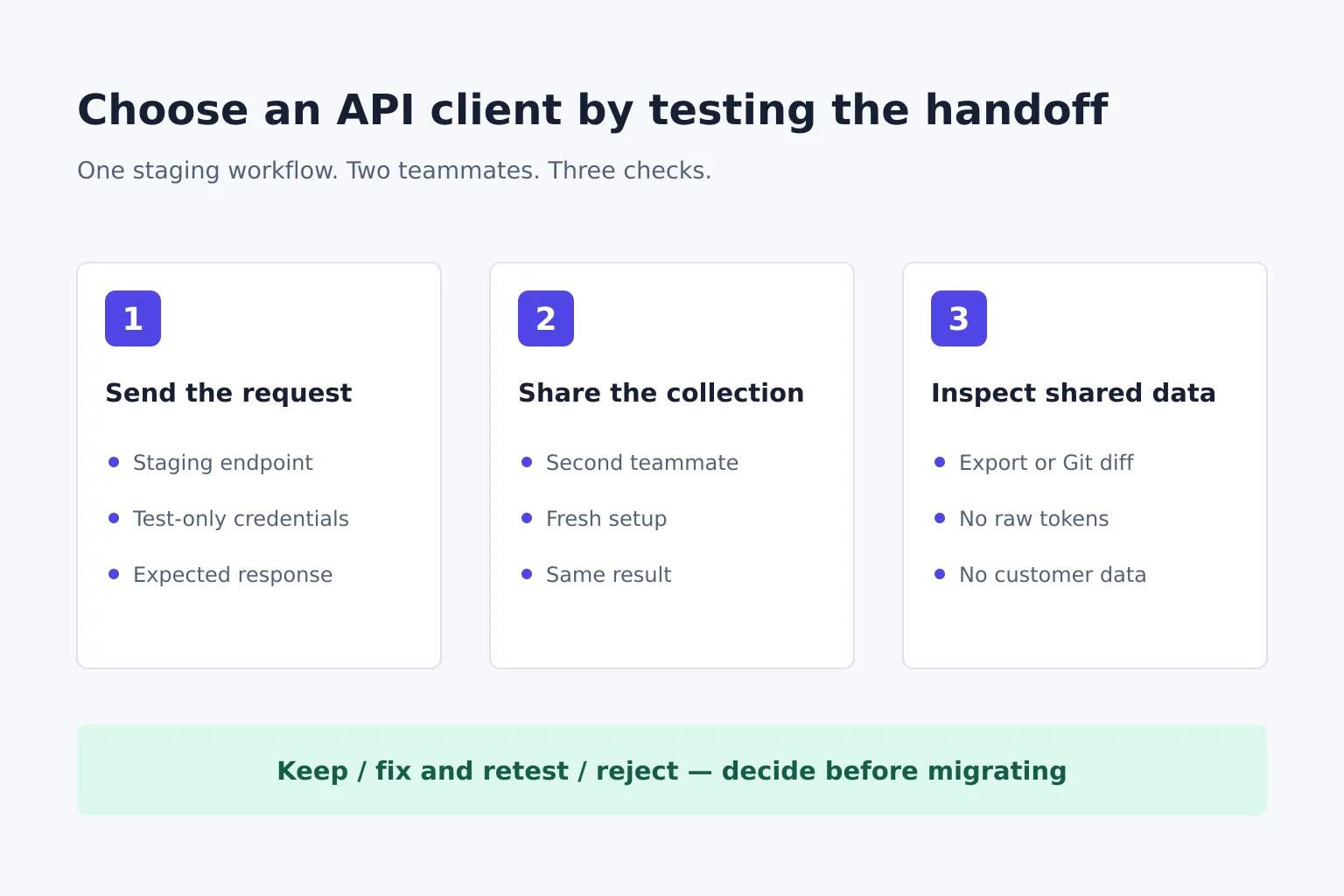
Choose an API client by testing your team's real request workflow, not by counting features. Check whether it reaches your staging API, keeps credentials out of shared files and lets a second teammate reproduce the same request. Shortlist tools by how you want to share collections, then run a small handoff test before moving your existing work.
How do you choose an API client?
An API client is a tool for sending requests to an API and inspecting its responses. For a small team, the choice depends on where request collections live, who changes them and how credentials are supplied.
Write down these requirements before installing anything:
- Request: the protocol and authentication your API actually uses, including any VPN, proxy or client certificate requirement.
- Sharing: whether changes should go through Git review or a shared workspace, and whether everyone using the collection can follow that process.
- Data: where requests, environments and history may be stored, and which credentials or customer details must never be shared.
- Automation: whether a person only needs to send requests, or the same collection must also run in CI.
A tool that sends one public GET request has passed only the easiest check. Your actual authentication and teammate handoff are the more useful tests.
Start with the collection-sharing model
Bruno and Hoppscotch are two starting points for teams that need a focused API client. Neither is a universal winner; the table describes documented workflows, not measured speed or reliability.
| Tool | First reason to try it |
|---|---|
| Bruno | Review local collection files through Git, beside application code. |
| Hoppscotch | Work through web, desktop or CLI clients, with hosted and self-hosted options. |
Bruno's trade-off is the Git process: teammates need to be able to use it, and advanced in-app Git actions are paid. Hoppscotch's trade-off depends on deployment: browser access can require an interceptor, while self-hosting adds infrastructure maintenance.
Bruno's collaboration documentation describes both external Git commands and an in-app Git interface. Its free interface includes clone, pull and text diffs; in-app commit, push, branching and conflict resolution require a paid edition. Don't confuse paying for those buttons with needing a paid edition to manage collection files through your existing Git tools.
As of 18 November 2026, Bruno's pricing page lists Open Source at $0, Pro at $6 per user per month billed annually, and Ultimate at $11 per user per month billed annually. A three-person Pro team would therefore budget $216 for a year at that listed rate, before any applicable taxes.
Hoppscotch's quick start offers a free cloud starting point and a free, open-source Community Edition for self-hosting. Evaluate the cost of the deployment you intend to use: a free software licence doesn't cover running, updating and backing up your own service.
Try Bruno first when reviewing request changes beside code is a requirement. Try Hoppscotch first when access through a web client or a self-hosted workspace is the main requirement. If your current platform already provides essential monitors, mocks or other workflows, list those separately before replacing it with a client.
Run one staging workflow with two teammates
Use a disposable staging account and synthetic data. Here's a fictional example: a two-person team needs to create a test project, fetch it by ID and confirm that an invalid token is rejected.
Give each candidate the same exercise:
- Create a small collection. Add a POST request to
/projectsand a GET request to/projects/{id}on your own staging API. Put the base URL in an environment variable rather than copying it into every request. - Supply a test credential locally. Use the client's documented secret mechanism. Keep the real value out of request examples and shared environment files.
- Check outcomes, not just successful sends. Create the synthetic project, fetch the returned ID and compare the response with your API's documented result. Repeat with an invalid token and check the expected error.
- Hand the collection to the second teammate. Use the sharing method you plan to adopt. They should start from a fresh setup, supply their own credential and complete the same sequence using only the written setup notes.
- Change one request. Have the teammate add a harmless header or edit synthetic input. Check whether you can identify the change and understand which collection version you now have.
- Inspect what was shared. Review the export, repository diff or workspace contents for raw tokens, cookies, private URLs and customer data. Masked text on a screen isn't evidence that an export omits its value.
Record setup problems and missing instructions as they occur. If CI is required, add one more acceptance check: run that same workflow in your intended CI environment with its own test credentials. An interactive success doesn't prove the automated path works.
Separate client problems from network problems
A browser-based client may fail even when an API works from another environment. Hoppscotch's interceptor documentation explains options including its local Agent, a proxy and a browser extension for dealing with CORS restrictions.
If a request fails, first compare the method, URL, headers and authentication with a known working request. Then identify where it runs: browser, desktop, local agent or remote proxy. Check whether that path can reach your VPN-only or local API and whether routing its data there is allowed.
Don't disable an API's security controls merely to make a trial look successful. Choose an approved connection path, document any extra installation and repeat the teammate test with that configuration.
Imported collections need the same care. Confirm the authentication, variable values, scripts and expected responses after import; an import-success message doesn't establish that the original workflow still behaves correctly.
Decide what to keep, fix or reject
Use the test notes to make a decision without hiding a blocking problem inside an overall score:
- Keep: both teammates complete the staging workflow, changes are understandable and shared data meets your rules.
- Fix and retest: a specific setup step, environment mapping or script needs work; assign an owner and rerun the failed step.
- Reject for this workflow: a required protocol, approved network path, sharing process or data rule cannot be met.
Keep the old collection available until the replacement passes. Migrate a small working collection before a large workspace, and preserve a way back if required behaviour changes.
LaunchNest is our software-discovery directory; its API-client collection brings Bruno and Hoppscotch's current listing summaries and official links together, with a public shortlist you can share. These are editorial selections, not owner endorsements or hands-on benchmarks. Use the collection to choose candidates, then use the staging test above to make the team decision.